
Record rent payments and charges
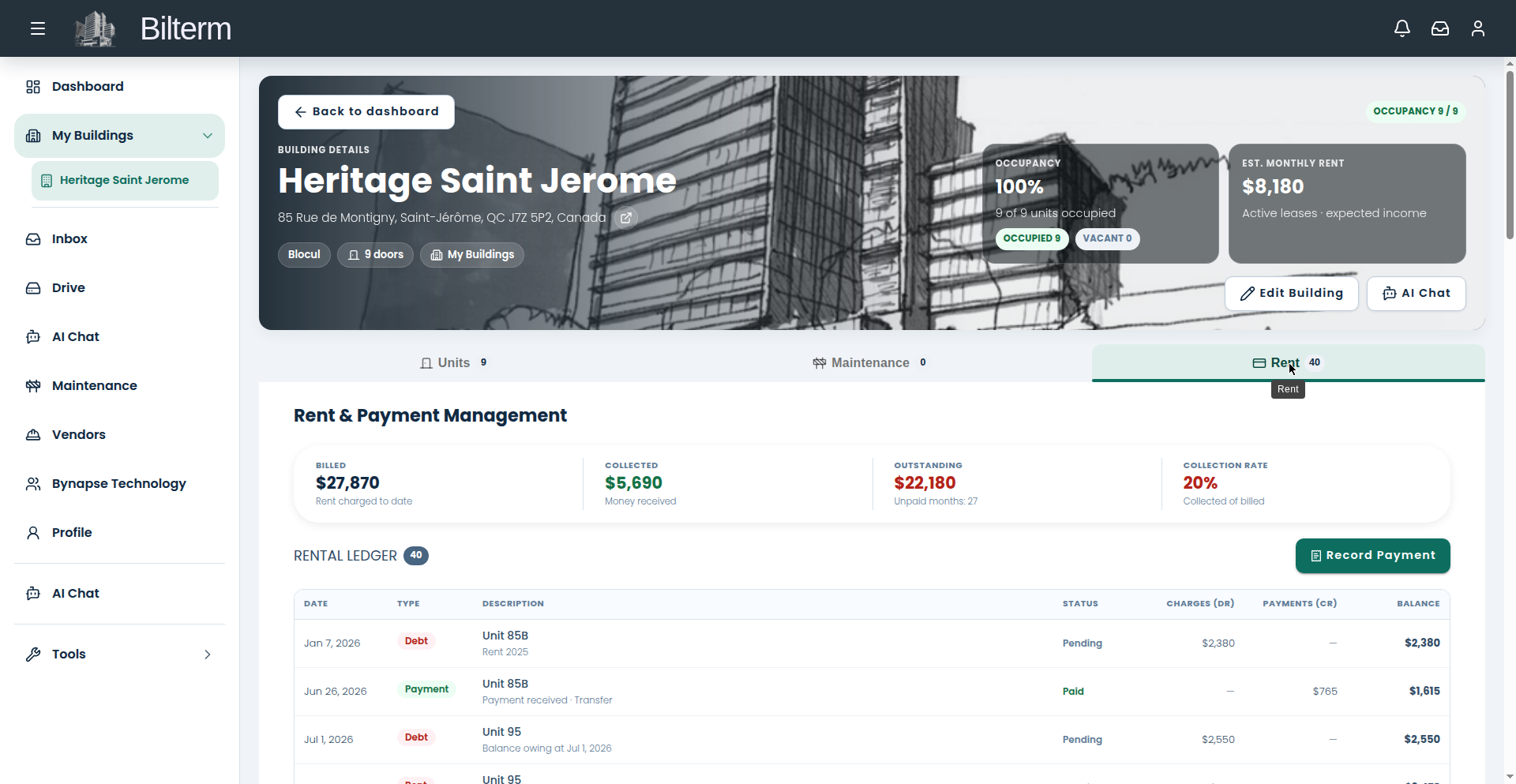
Bilterm’s rent ledger is manual: you record each payment and each charge. That sounds old-fashioned, but it means the ledger always matches reality — no sync surprises, no duplicate transactions.
- Open the building and go to the Rent tab — “Rent & Payment Management.”
- Click Record Payment.
- In the dialog, pick the Lease the payment belongs to (the picker shows current leases, e.g. “Unit 93 · Sep 20, 2026 – Sep 19, 2027”).
- Enter the Amount received and the Date received (calendar picker) — both required.
- Choose the Payment Method: Transfer, Cheque, Cash, Card, Digital wallet, or Other. Save.
- To bill something — monthly rent, a fee, an adjustment — use the record-charge action instead. It creates a debt entry on the same ledger.
- To forgive an amount, use Waive debt. The waiver is recorded with an audit trail rather than silently deleting the charge.
Tips
- Record payments the day they arrive. A ledger that’s a month behind is a ledger you stop trusting.
- The Payment Method field is worth filling in honestly — when a tenant disputes a payment six months later, “Cash, recorded same day” settles the argument.
- Waiving is better than deleting. A waived debt shows the full story; a deleted charge looks like the books were cooked.
Leave a Reply
Want to join the discussion?Feel free to contribute!