Read the rent ledger (who owes you money)
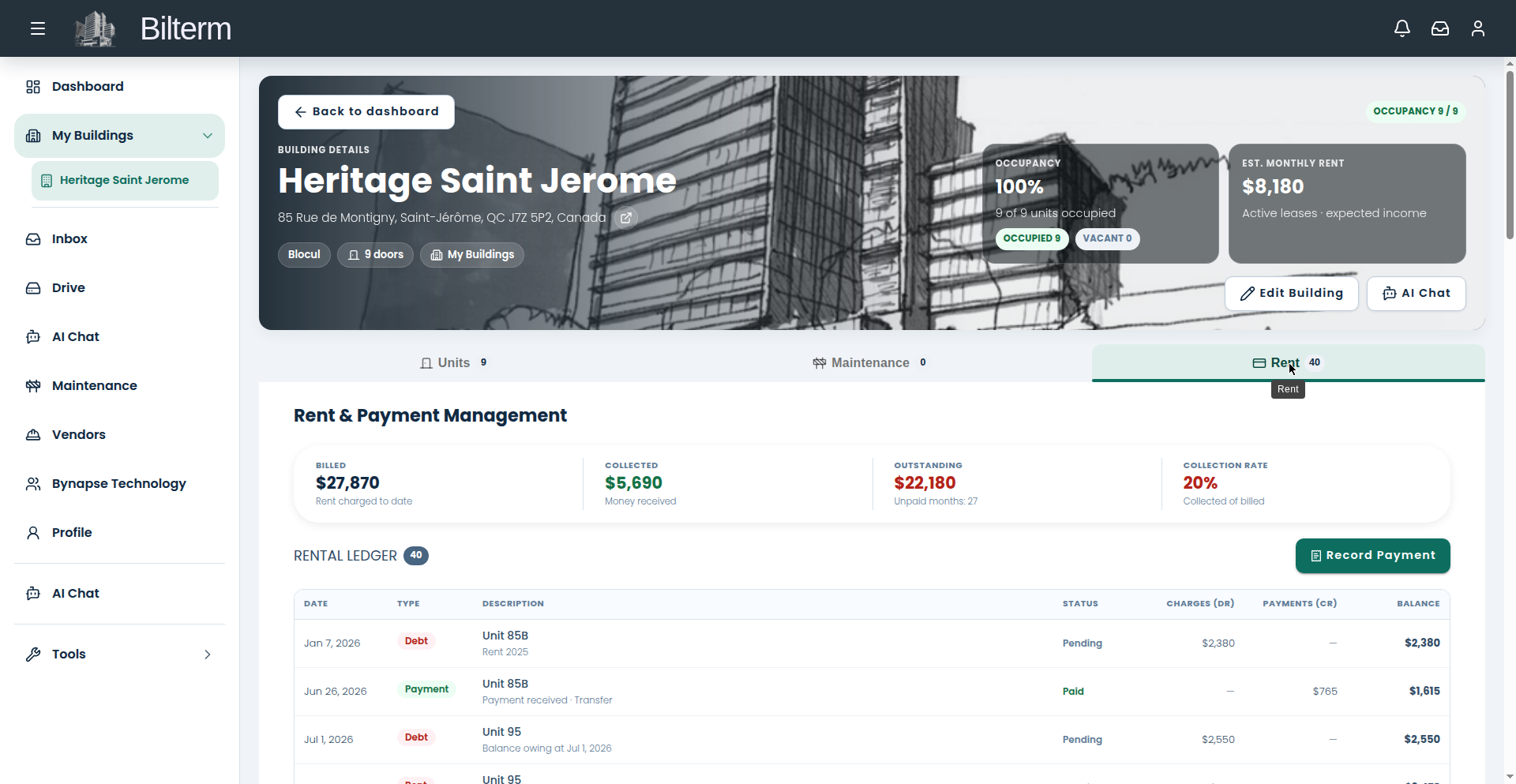
“Who owes me money?” The answer lives on the building’s Rent tab. Learn to read it and you’ll never guess again.
- Open the building and go to the Rent tab.
- Read the four headline figures first: Billed (total charges), Collected (total payments), Outstanding (the difference), and Collection Rate (collected as a share of billed).
- Scroll to the Rental Ledger table. Each row is one entry with: Date, Type (Debt, Rent, or Payment), Description (e.g. “Unit 85A, J. Tremblay — Aug 2026”), Status (Paid or Pending), Charges, Payments, and the running Balance.
- Filter by lease to see one tenancy’s full history, or by status to isolate everything still Pending.
- Use the per-row action menu for row-level operations (open, edit, or reverse an entry).
Tips
- Outstanding is the number that matters month to month. If it grows three months in a row, you have a collections problem, not a bookkeeping problem.
- The Collection Rate is your building’s report card. Anything under 90% deserves a plan, not a shrug.
- A note on the AI assistant: it can’t read the ledger yet. “Who owes me money” is a ledger question — come here, not the chat.
Leave a Reply
Want to join the discussion?Feel free to contribute!